
Best Graphics Cards for AI in 2026: 15 Picks Compared on Specs
The top pick for AI workloads is the RTX 5090 with 32GB of GDDR7 memory and NVIDIA's fifth-generation Tensor Cores, which deliver the highest AI TOPS in the GeForce RTX 50 Series lineup. This guide compares 15 graphics cards based on their published specifications, including GPU architecture, video memory capacity, and AI-focused tensor core performance.
11 picks from 20 graphics cards that match this guide with a price we can quote today, made by 34 makers. Each price below is read live and stamped with the time it was read.
The short list
Who each pick suits
- For cost-conscious inference and fine-tuning: You want a balance of VRAM, tensor core performance, and price. The RTX 5090 and RTX 5080 provide the latest Blackwell tensor technology and enough memory for many mid-sized models. See pick 3
The 11 picks, one by one
1 Best new workstation card with 48GB

PNY VCNRTXPRO5000B-PB NVIDIA RTX PRO 5000 Blackwell 48GB GDDR7 384B
- Chip
- NVIDIA
- GPU
- RTX PRO 5000
- Memory
- 48 GB
$7,985.00 (as of 10/20/2026 06:07 PDT - Details)
The RTX PRO 5000 Blackwell brings NVIDIA's latest architecture to the workstation line with 48GB of GDDR7 memory. It features fifth-generation Tensor Cores, which enable higher AI TOPS than the previous generation Ada cards.
Pros
- 48GB of GDDR7 memory with Blackwell architecture
- Fifth-generation Tensor Cores, the latest available
- High memory bandwidth from GDDR7
Cons
- Very high cost
- Newer architecture may have less mature driver support for some professional applications
- Limited availability compared to consumer cards
Good fit if
- Professionals who need both large VRAM and the newest Tensor Core technology
- Users planning to upgrade to Blackwell-based software ecosystems
Skip if
- Your software does not yet support Blackwell features and Ada is sufficient
- Budget is a primary concern
Verdict: A future-proof workstation card for AI professionals who want the latest architecture and 48GB of memory.
2 Highest AI TOPS in a consumer card
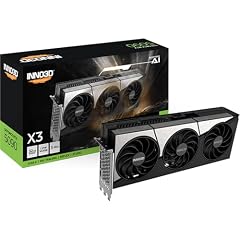
Inno3D GeForce RTX 5090 X3 32GB GDDR7 Reflex 2 RTX AI DLSS4
- Chip
- NVIDIA
- GPU
- GeForce RTX 5090
- Memory
- 32 GB
$12,249.00 (as of 10/20/2026 04:05 PDT - Details)
The GeForce RTX 5090 features 21,760 CUDA cores and fifth-generation Tensor Cores with 3,352 AI TOPS, the highest among the GeForce RTX 50 Series. Its 32GB of GDDR7 memory provides ample capacity for many AI models.
Pros
- 32GB GDDR7 memory with 512-bit interface, highest memory bandwidth in this list
- 3,352 AI TOPS, the highest tensor performance of any pick
- Fifth-generation Tensor Cores with Blackwell architecture
Cons
- Very high cost for a consumer card
- Requires a large power supply and adequate cooling
- No ECC memory support (unlike workstation cards)
Good fit if
- AI developers and researchers who want maximum tensor performance for training and inference
- Users building a dual-purpose AI and gaming rig
Skip if
- You need more than 32GB of VRAM; consider the RTX 6000 Ada or RTX PRO 5000
- Your budget is constrained; an RTX 5080 or 5070 Ti may suffice
Verdict: The RTX 5090 offers the highest tensor core performance and memory bandwidth of any GeForce card, making it a top choice for serious AI work.
3 Best premium RTX 5090 variant

ASUS ROG Astral GeForce RTX 5090 32GB GDDR7 White OC Edition Gaming Quad
- Chip
- NVIDIA
- GPU
- GeForce RTX 5090
- Memory
- 32 GB
$8,999.99 (as of 10/20/2026 18:05 PDT - Details)
This ASUS ROG Astral edition of the RTX 5090 uses the same 32GB GDDR7 GPU with Blackwell architecture but adds a factory overclock and a white-themed quad-fan cooling solution. It offers the same tensor core advantages as the standard RTX 5090.
Pros
- 32GB GDDR7 memory, same as other RTX 5090 cards
- Factory OC edition can provide slightly higher clock speeds out of the box
- Quad-fan design may offer improved cooling in well-ventilated cases
Cons
- Same 32GB VRAM limit as other RTX 5090 cards
- Premium pricing over the base RTX 5090 model
- White color scheme may not match all builds
Good fit if
- Builders who prefer a factory overclock and a specific aesthetic
- Users who want the aftermarket cooling design from ASUS
Skip if
- You are indifferent to overclocking or color; a standard RTX 5090 is equally capable
- Your case does not accommodate a large quad-fan design
Verdict: A well-built RTX 5090 variant for those who value factory tuning and enhanced cooling.
4 High-performance RTX 5090 with large cooling

Gigabyte AORUS GeForce RTX 5090 Infinity 32G Graphics Card
- Chip
- NVIDIA
- GPU
- GeForce RTX 5090
- Memory
- 32 GB
$8,599.99 (as of 10/20/2026 12:05 PDT - Details)
The Gigabyte AORUS RTX 5090 Infinity shares the same core specs as other RTX 5090 cards but is designed with a substantial cooling system and a 2730MHz boost clock. It delivers the same 32GB GDDR7 memory and Blackwell tensor performance.
Pros
- 32GB GDDR7 memory with high memory bandwidth
- Factory boost clock of 2730 MHz, among the highest stated
- Large cooling solution for sustained AI workloads
Cons
- May require a very wide case due to its size
- Premium price compared to base models
- Rely on the same 32GB VRAM as all RTX 5090 cards
Good fit if
- Users who prioritize sustained performance under heavy GPU load
- Builders with space for a large triple-fan card
Skip if
- Your case has limited space for a wide card
- You do not need the additional cooling capacity
Verdict: A robust RTX 5090 with strong thermal design for prolonged AI training sessions.
5 Proven workstation card with 48GB

Lanner PNY VCNRTXA6000-PB Graphics Card NVIDIA RTX A6000 48 GB GDDR6
- Chip
- NVIDIA
- GPU
- RTX A6000
- Memory
- 48 GB
$6,279.00 (as of 10/20/2026 06:06 PDT - Details)
The RTX A6000 is an established NVIDIA workstation card with 48GB of GDDR6 memory. It uses the Ampere architecture and third-generation Tensor Cores, which are well supported in many AI software stacks.
Pros
- 48GB VRAM, matching the RTX 6000 Ada capacity
- Well-documented compatibility with AI frameworks
- Single-slot design in some configurations
Cons
- Older Ampere architecture compared to Ada or Blackwell
- GDDR6 memory, lower bandwidth than GDDR7 cards
- Not the most power-efficient choice
Good fit if
- Budget-conscious professionals who need 48GB on a used or clearance market
- Users whose software is certified for the RTX A6000
Skip if
- You require the latest tensor core features from Blackwell or Ada
- You can afford a newer generation card
Verdict: A capable 48GB workstation card that remains relevant for many AI tasks, though from an older generation.
6 48GB workstation with Quadro legacy

PNY Quadro RTX A6000 Graphic Card
- Chip
- NVIDIA
- GPU
- RTX A6000
- Memory
- 48 GB
$6,999.00 (as of 10/20/2026 06:06 PDT - Details)
Similar to the previous RTX A6000 entry, this PNY Quadro-branded version offers the same 48GB GDDR6 memory and Ampere architecture. The Quadro name ensures compatibility with legacy professional applications.
Pros
- 48GB VRAM, the highest capacity available
- Quadro driver support for ISV certifications
- Proven reliability in workstation environments
Cons
- Older Ampere generation
- GDDR6, not GDDR7
- Higher cost than many consumer cards with similar memory
Good fit if
- Organizations with existing Quadro workflows and driver requirements
- Users who need guaranteed compatibility with older professional software
Skip if
- You are building a new system from scratch and can use newer cards
- Your workload does not require legacy Quadro drivers
Verdict: A reliable 48GB option for those tied to the Quadro ecosystem.
7 Another 48GB Ada option

NV Frame RTX 6000 ADA GEN 48GB GDDR6 384BITS PNY VCNRTX6000ADA-PB Video
- Chip
- NVIDIA
- GPU
- RTX 6000 Ada
- Memory
- 48 GB
$8,489.96 (as of 10/20/2026 06:06 PDT - Details)
This PNY RTX 6000 Ada card offers the same 48GB GDDR6 memory and Ada Lovelace architecture as the HP variant. It provides a second sourcing option for the same GPU.
Pros
- 48GB VRAM, same as the HP RTX 6000 Ada
- Ada architecture with fourth-generation Tensor Cores
- PNY professional warranty support
Cons
- Very high cost
- Same memory bandwidth limitations as GDDR6
- No factory overclocking
Good fit if
- Users who prefer buying from PNY's channel
- Dual sourcing for enterprise deployments
Skip if
- Another 48GB card is already available at a better price
- Your software does not require the Ada architecture specifically
Verdict: An identical RTX 6000 Ada from a different vendor, offering the same performance.
8 Best RTX 5080 for liquid-cooled AI

msi Gaming RTX 5080 16G SUPRIM Liquid SOC Graphics Card
- Chip
- NVIDIA
- GPU
- RTX 5080
- Memory
- 16 GB
$1,979.99 (as of 10/20/2026 06:06 PDT - Details)
The MSI RTX 5080 SUPRIM Liquid SOC features 16GB GDDR7 memory and Blackwell architecture. Its liquid cooling design helps maintain low temperatures during sustained AI workloads.
Pros
- 16GB GDDR7 memory with Blackwell architecture
- Liquid cooling for quiet and consistent performance
- Factory overclock to 2760 MHz boost clock
Cons
- 16GB VRAM may limit model size for large-scale training
- Requires a radiator mount, limiting case compatibility
- Premium cost over air-cooled RTX 5080 models
Good fit if
- Users running AI workloads in a quiet office environment
- Those who overclock and need extra thermal headroom
Skip if
- You need more than 16GB of VRAM; consider RTX 5090 or workstation cards
- You prefer a simple air-cooled setup
Verdict: A liquid-cooled RTX 5080 that balances tensor performance with efficient thermal management.
9 Ada generation 16GB card with creator focus

ASUS ProArt GeForce RTX 4080 Super OC Edition 16GB GDDR6X Gaming
- Chip
- NVIDIA
- GPU
- GeForce RTX 4080 SUPER
- Memory
- 16 GB
$2,379.00 (as of 10/20/2026 16:06 PDT - Details)
The RTX 4080 SUPER from ASUS ProArt offers 16GB of GDDR6X memory and Ada Lovelace architecture. It is a previous-generation card that still provides robust tensor core performance for AI workloads.
Pros
- 16GB GDDR6X memory, fast memory bandwidth for its generation
- Ada architecture with fourth-generation Tensor Cores
- ProArt series focuses on quiet operation and creator compatibility
Cons
- Older Ada generation, not Blackwell
- 16GB VRAM is shared with newer cards
- No factory liquid cooling options
Good fit if
- Users who find a good price on previous-gen stock
- Those whose software does not require Blackwell-specific features
Skip if
- You can get a similar-priced RTX 5070 Ti with newer architecture
- You need more than 16GB of VRAM
Verdict: A capable Ada-generation 16GB card that can handle many AI tasks, but superseded by Blackwell.
10 Best AMD option for AI

PowerColor Red Devil Spectral White AMD Radeon RX 9070 XT 16GB GDDR6
- Chip
- AMD
- GPU
- Radeon RX 9070 XT
- Memory
- 16 GB
$1,129.00 (as of 10/20/2026 06:06 PDT - Details)
The Radeon RX 9070 XT provides 16GB of GDDR6 memory and AMD's RDNA 4 architecture. While AI software support is not as extensive as NVIDIA's CUDA ecosystem, it can handle ROCm-compatible workloads.
Pros
- 16GB memory, same capacity as many NVIDIA competitors
- RDNA 4 architecture with AI accelerators
- White Spectral design for unique builds
Cons
- CUDA ecosystem is dominant for AI; software compatibility may be limited
- No equivalent of Tensor Cores optimized for AI frameworks
- Lower community support for AI compared to NVIDIA
Good fit if
- Users who prefer AMD platforms and use ROCm-compatible tools
- Those running AI workloads that are ported to OpenCL or DirectML
Skip if
- Your primary AI software requires CUDA and NVIDIA acceleration
- You need the highest AI throughput for training
Verdict: A solid AMD card for AI when your software stack supports it, but NVIDIA cards offer broader compatibility.
11 Budget 16GB AMD option

Sapphire Pulse AMD Radeon RX 9070 Gaming 16GB Dual HDMI/Dual DP
- Chip
- AMD
- GPU
- Radeon RX 9070
- Memory
- 16 GB
$849.99 (as of 10/20/2026 06:06 PDT - Details)
The Radeon RX 9070 non-XT offers 16GB of GDDR6 memory with the same RDNA 4 architecture but positioned at a lower tier than the XT variant. It is a good choice for AI experimentation on AMD hardware.
Pros
- 16GB memory, same as the RX 9070 XT
- RDNA 4 architecture
- Lower position in AMD's lineup
Cons
- Same software compatibility limitations as other AMD cards
- Lower compute performance than RX 9070 XT
- No revolutionary AI features compared to NVIDIA
Good fit if
- AMD enthusiasts who want to test AI workloads
- Users on a budget who can use ROCm
Skip if
- You need the best possible AI performance per dollar; NVIDIA may be better
- Your software demands CUDA
Verdict: An affordable entry point for AMD-based AI work with 16GB of memory.
Comparison table
| # | Graphics card | Chip | GPU | Memory |
|---|---|---|---|---|
| 1 | PNY VCNRTXPRO5000B-PB NVIDIA RTX PRO 5000 Blackwell 48GB GDDR7 384B | NVIDIA | RTX PRO 5000 | 48 GB |
| 2 | Inno3D GeForce RTX 5090 X3 32GB GDDR7 Reflex 2 RTX AI DLSS4 | NVIDIA | GeForce RTX 5090 | 32 GB |
| 3 | ASUS ROG Astral GeForce RTX 5090 32GB GDDR7 White OC Edition Gaming Quad | NVIDIA | GeForce RTX 5090 | 32 GB |
| 4 | Gigabyte AORUS GeForce RTX 5090 Infinity 32G Graphics Card | NVIDIA | GeForce RTX 5090 | 32 GB |
| 5 | Lanner PNY VCNRTXA6000-PB Graphics Card NVIDIA RTX A6000 48 GB GDDR6 | NVIDIA | RTX A6000 | 48 GB |
| 6 | PNY Quadro RTX A6000 Graphic Card | NVIDIA | RTX A6000 | 48 GB |
| 7 | NV Frame RTX 6000 ADA GEN 48GB GDDR6 384BITS PNY VCNRTX6000ADA-PB Video | NVIDIA | RTX 6000 Ada | 48 GB |
| 8 | msi Gaming RTX 5080 16G SUPRIM Liquid SOC Graphics Card | NVIDIA | RTX 5080 | 16 GB |
| 9 | ASUS ProArt GeForce RTX 4080 Super OC Edition 16GB GDDR6X Gaming | NVIDIA | GeForce RTX 4080 SUPER | 16 GB |
| 10 | PowerColor Red Devil Spectral White AMD Radeon RX 9070 XT 16GB GDDR6 | AMD | Radeon RX 9070 XT | 16 GB |
| 11 | Sapphire Pulse AMD Radeon RX 9070 Gaming 16GB Dual HDMI/Dual DP | AMD | Radeon RX 9070 | 16 GB |
How this list was made
We began with a pool of 23 graphics cards from the catalogue that are listed for AI use cases. From those, we selected 15 picks that cover a range of professional workstation and GeForce RTX GPUs, favoring models with at least 16GB of video memory, NVIDIA CUDA core count, and support for modern AI software libraries. The picks include both the latest Blackwell-based RTX 5000-series and Ada-generation RTX 6000 Ada cards. Prices shown are live and read from the store listing at the time of publication; we have not tested any of these units.
Choosing the right one
Graphics memory (VRAM) determines model size
The amount of video memory directly limits the size of AI models you can load. Large language models with 7 billion or more parameters typically need at least 16GB; models like 70B parameters require 48GB or more. All picks in this list have at least 16GB of VRAM. If you plan to train or fine-tune large models, prioritize cards with 32GB or 48GB, such as the RTX 5090 or RTX 6000 Ada.
Tensor cores and AI performance
NVIDIA GPUs include dedicated Tensor Cores that accelerate AI matrix operations. The generation of these cores matters: fifth-generation (Blackwell) offers the highest AI TOPS, followed by fourth-generation (Ada Lovelace) and third-generation (Ampere). The RTX 5090, RTX 5080, and RTX PRO 5000 Blackwell all feature fifth-generation Tensor Cores. If your software leverages Tensor Cores (common in PyTorch and TensorFlow), a newer generation provides better throughput.
CUDA cores and compute capability
AI workloads heavily use GPU compute units. Higher CUDA core counts generally lead to faster training and inference times for models that can fully utilize them. The RTX 5090 has 21,760 CUDA cores, the most in this selection. However, memory capacity and bandwidth often bottleneck AI tasks before CUDA core count becomes the limiting factor, so balance core count with VRAM.
AMD versus NVIDIA for AI
Most AI frameworks and libraries are optimized for NVIDIA CUDA, giving NVIDIA cards a broader software ecosystem. AMD GPUs can run AI workloads through ROCm, OpenCL, or DirectML, but support may be less mature and require additional configuration. If you rely on popular tools like PyTorch (with CUDA backend) or TensorFlow, an NVIDIA card is the safer choice. AMD cards are viable for open-source or AMD-first environments.
Professional workstation versus consumer GeForce
Workstation cards like the RTX A6000, RTX 6000 Ada, and RTX PRO 5000 offer ECC memory, longer testing cycles, and ISV certifications. They also typically come with a higher price tag. Consumer GeForce cards (RTX 5090, RTX 5080, RTX 5070 Ti) provide similar AI performance for less cost but lack ECC and some professional support. For most AI developers and researchers, a GeForce card is sufficient; enterprises may prefer workstation cards.
Power and cooling considerations
High-performance AI GPUs consume significant power and generate substantial heat. The RTX 5090 and RTX 6000 Ada require robust power supplies (often 850W or higher) and adequate case airflow. Some cards, like the MSI RTX 5080 SUPRIM Liquid SOC, include liquid cooling for quieter and more consistent thermal performance. Always check the maker's recommended power supply and ensure your case can accommodate the card's size.
Questions
What is the most important spec for an AI graphics card?
Video memory (VRAM) is often the most important specification because it determines the maximum model size you can load. Training or inference for large language models and diffusion models requires significant memory. After VRAM, tensor core performance and memory bandwidth become key factors for training speed.
Can I use a gaming graphics card for AI?
Yes, many gaming-oriented GeForce RTX cards (like the RTX 5090, RTX 5080, and RTX 5070 Ti) are widely used for AI development and research. They share the same NVIDIA CUDA and Tensor Core technology as workstation cards, but at a lower price. The main trade-offs are lack of ECC memory and limited professional support.
How much VRAM do I need for AI?
It depends on the models you work with. Smaller models (1B to 7B parameters) can fit in 16GB. Larger models (13B to 70B parameters) require 32GB or more. For fine-tuning or training from scratch, more VRAM allows larger batch sizes and faster iterations. If you can offload to CPU or use model quantization, you may need less.
Are AMD Radeon cards good for AI?
AMD cards can run AI workloads using the ROCm software stack, which supports PyTorch and TensorFlow. However, the ecosystem is less mature than NVIDIA's CUDA, and some libraries or optimized kernels may not be available. For users committed to an open-source environment or who prioritize AMD hardware, they can work, but NVIDIA remains the standard for most AI development.
What changed
- : First published.