
Best 32GB Graphics Cards in 2026: 3 Picks Compared on Specs
The top pick for a 32GB graphics card is the ASUS ROG Astral GeForce RTX 5090, a flagship GPU with 32GB of GDDR7 memory on a 512-bit interface. We selected it for its combination of memory capacity and advanced features like NVIDIA DLSS 5 and a quad-fan cooling design. This guide compares every 32GB graphics card available, based on published specifications from the makers.
3 picks from 13 graphics cards that match this guide with a price we can quote today, made by 34 makers. Each price below is read live and stamped with the time it was read.
The short list
| # | Pick | Graphics card | Price |
|---|---|---|---|
| 1 | Best overall | ASUS ROG Astral GeForce RTX 5090 32GB GDDR7 White OC Edition Gaming Quad | $8,999.99 (as of 10/20/2026 18:05 PDT - Details) |
| 2 | Best for high clock speeds | Gigabyte AORUS GeForce RTX 5090 Infinity 32G Graphics Card | $8,599.99 (as of 10/20/2026 12:05 PDT - Details) |
| 3 | Best for multi-GPU workstations | Inno3D GeForce RTX 5090 X3 32GB GDDR7 Reflex 2 RTX AI DLSS4 | $12,249.00 (as of 10/20/2026 04:05 PDT - Details) |
Who each pick suits
- For uncompromising 4K gaming and AI workloads: The RTX 5090 with 32GB of VRAM is overkill for most games, but essential for high-end 4K gaming with maxed ray tracing and for AI inference or model training. If you need the highest possible memory bandwidth and AI TOPS, pick any of the three, but the ASUS ROG Astral stands out with its large cooling solution and white aesthetic. See pick 1
- For value-focused buyers who still need 32GB: All three 32GB cards are premium-priced flagships, but the Gigabyte AORUS GeForce RTX 5090 Infinity offers a core clock of 2730MHz and a capable triple-fan design at a lower current listing price. It is a solid choice if you want the full 32GB and the RTX 5090 feature set without paying for a white or quad-fan model. See pick 2
- For professional 3D rendering and multi-GPU setups: The INNO3D GeForce RTX 5090 X3 is the most compact and straightforward RTX 5090 in this list, with a triple-fan design. If you need multiple 32GB GPUs for rendering or simulation, its simpler design may fit in a workstation chassis more easily than larger cards. See pick 3
The 3 picks, one by one
1 Best overall

ASUS ROG Astral GeForce RTX 5090 32GB GDDR7 White OC Edition Gaming Quad
- Chip
- NVIDIA
- GPU
- GeForce RTX 5090
- Memory
- 32 GB
$8,999.99 (as of 10/20/2026 18:05 PDT - Details)
The ASUS ROG Astral GeForce RTX 5090 combines 32GB of GDDR7 memory with a 512-bit interface and a large quad-fan cooling system. It is the only pick with a white OC Edition design, offering the highest potential for overclocking out of the box. Its feature set is identical to the other RTX 5090 cards, but the cooling and aesthetic make it the standout choice.
Pros
- 32GB GDDR7 memory with 512-bit interface and 1792 GB/s bandwidth
- Quad-fan cooling design for sustained performance
- White OC Edition with factory overclock
- Supports NVIDIA DLSS 5, Dynamic Multi Frame Generation, and 4th-gen ray tracing
Cons
- Larger physical size may not fit smaller cases (3.8 slot)
- No stated weight or length in the listing
Good fit if
- Enthusiasts building a high-end 4K gaming rig with a white theme
- Users running AI inference or model training that needs 32GB VRAM
Skip if
- You need a smaller or single-fan card for a compact build
- You are on a strict budget where the current listing price is a concern
Verdict: The ASUS ROG Astral GeForce RTX 5090 is the best overall 32GB graphics card for its balanced combination of memory, cooling, and factory overclocking.
2 Best for high clock speeds

Gigabyte AORUS GeForce RTX 5090 Infinity 32G Graphics Card
- Chip
- NVIDIA
- GPU
- GeForce RTX 5090
- Memory
- 32 GB
$8,599.99 (as of 10/20/2026 12:05 PDT - Details)
The Gigabyte AORUS GeForce RTX 5090 Infinity has a stated core clock of 2730MHz, the highest boost clock among the three picks. It uses a triple-fan design and the same 32GB GDDR7 memory. It is a strong alternative to the ASUS card for those who prioritize raw clock speed over multi-fan cooling.
Pros
- 2730MHz core clock, the highest boost clock in this list
- 32GB GDDR7 memory with 512-bit interface
- Triple-fan cooling with Infinity nameplate design
- PCIe 5.0 support for latest motherboard compatibility
Cons
- No factory overclock edition mentioned in the listing name
- Cooling may not be as robust as quad-fan designs under sustained load
Good fit if
- Gamers who want the highest possible clock speeds for frame rates
- Builders who prefer a triple-fan card over a quad-fan model
Skip if
- You want a white-themed build or a card with a factory OC
- You need the most aggressive cooling for all-day rendering
Verdict: The Gigabyte AORUS GeForce RTX 5090 Infinity is the pick for those who want the highest boost clock available in a 32GB GPU.
3 Best for multi-GPU workstations
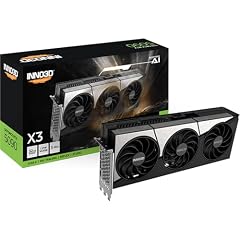
Inno3D GeForce RTX 5090 X3 32GB GDDR7 Reflex 2 RTX AI DLSS4
- Chip
- NVIDIA
- GPU
- GeForce RTX 5090
- Memory
- 32 GB
$12,249.00 (as of 10/20/2026 04:05 PDT - Details)
The INNO3D GeForce RTX 5090 X3 is a straightforward, triple-fan implementation of the RTX 5090 with 32GB of GDDR7. It lacks the oversized shroud of some competitor models, which may make it easier to install multiple cards in a single system. It supports all the same NVIDIA features including DLSS 5 and Reflex 2.
Pros
- Standard-sized triple-fan design suitable for multi-GPU setups
- 32GB GDDR7 memory with full 512-bit bandwidth
- Includes Reflex 2 and DLSS 4 support as published by NVIDIA
Cons
- No factory overclock listed in the product name
- Branding and cooler design may be less premium than ASUS or Gigabyte
Good fit if
- Workstation users building a render farm with multiple 32GB GPUs
- Users who want a no-frills RTX 5090 with full 32GB VRAM
Skip if
- You need a card with a white aesthetic or factory overclock
- You want the best cooling performance for single-GPU gaming
Verdict: The INNO3D GeForce RTX 5090 X3 is the best choice for multi-GPU workstations that need 32GB of VRAM per card.
Comparison table
| # | Graphics card | Chip | GPU | Memory |
|---|---|---|---|---|
| 1 | ASUS ROG Astral GeForce RTX 5090 32GB GDDR7 White OC Edition Gaming Quad | NVIDIA | GeForce RTX 5090 | 32 GB |
| 2 | Gigabyte AORUS GeForce RTX 5090 Infinity 32G Graphics Card | NVIDIA | GeForce RTX 5090 | 32 GB |
| 3 | Inno3D GeForce RTX 5090 X3 32GB GDDR7 Reflex 2 RTX AI DLSS4 | NVIDIA | GeForce RTX 5090 | 32 GB |
How this list was made
We started with the full pool of graphics cards listed with 32GB of video memory. After removing near-duplicates, the pool contained three models: all are GeForce RTX 5090 GPUs from different board partners. Each pick was evaluated on its stated specifications, including GPU core, memory bandwidth, cooling configuration, and features such as DLSS and ray tracing support. Prices are live and read from the store listing at the time of writing. No units were tested or handled by our team. All specifications come from the pool data and the manufacturer's published pages.
Choosing the right one
Why 32GB of VRAM matters
Graphics cards with 32GB of video memory are designed for extreme workloads. In gaming, this much VRAM is rarely needed today, but it provides headroom for high-resolution texture packs, 4K and 8K gaming, and future game releases. For creators, 32GB allows working with very large 3D scenes, 8K video editing, and AI model training without running out of memory. The only current chips that offer 32GB in a consumer card are the NVIDIA GeForce RTX 5090, which uses GDDR7 memory on a 512-bit bus for 1792 GB/s bandwidth.
GeForce RTX 5090: the only 32GB option
As of this writing, every 32GB graphics card in the market is based on the NVIDIA GeForce RTX 5090 GPU. The RTX 5090 has 21,760 CUDA cores, fifth-generation Tensor cores, and fourth-generation ray tracing cores. It supports DLSS 5 with 3D-Guided Neural Rendering and Dynamic Multi Frame Generation. The main differences between models are the cooling solution, factory clock speeds, and physical size. No AMD or Intel graphics card currently sells with 32GB of VRAM.
Cooling design: triple or quad fans
The three RTX 5090 models in this list use either triple or quad fans. A quad-fan design, as on the ASUS ROG Astral, can move more air and keep the card cooler under sustained load, but it is larger and may not fit in all cases. Triple-fan cards like the Gigabyte AORUS and INNO3D X3 are more compact and easier to install in standard tower cases. For single-GPU setups, any of these will perform well; for multi-GPU builds, the smaller triple-fan models are preferable for spacing.
Consider your power supply and case
The NVIDIA GeForce RTX 5090 has a high power draw, typically requiring at least a 1000W power supply. Each board partner may recommend slightly different wattage. The physical size of the card also varies: the ASUS ROG Astral is a 3.8-slot design, while the Gigabyte and INNO3D are likely 3-slot or 3.5-slot. Measure your case clearance before purchasing, especially for depth and width. The PCIe 5.0 interface is standard across all models.
Stock availability and pricing
The RTX 5090 is a high-demand flagship GPU, and availability can fluctuate. Prices shown are live from the store listing and may change. Because all three cards use the same GPU core, the primary differentiator is cooling design, manufacturer warranty, and aesthetic. If you can find any RTX 5090 at a reasonable price relative to its specifications, it will deliver the same core features. The ASUS card with its quad-fan and factory OC may carry a premium.
Questions
Is 32GB of VRAM necessary for gaming?
For most current games, 32GB of VRAM is not necessary. Even at 4K with ultra settings, most games use 8GB to 16GB. However, some newer titles with high-resolution texture packs and heavy ray tracing can use more. 32GB provides future-proofing and is helpful for modders or those who play at 8K resolution.
Which graphics cards have 32GB of VRAM?
Currently, only the NVIDIA GeForce RTX 5090 is available with 32GB of VRAM in consumer graphics cards. It uses GDDR7 memory on a 512-bit memory interface. No AMD Radeon or Intel Arc graphics card currently offers 32GB of video memory in a standard desktop model.
Can 32GB graphics cards be used for AI and machine learning?
Yes. 32GB of VRAM is very useful for AI inference and training mid-sized models. Many large language models and image generation models can benefit from the extra memory, allowing larger batch sizes or higher resolution outputs. The RTX 5090's high memory bandwidth also speeds up data transfer.
What is the difference between these three RTX 5090 models?
The main differences are cooling design, factory clock speeds, and physical size. The ASUS ROG Astral has a quad-fan cooler and a white OC edition with factory overclock. The Gigabyte AORUS has a triple-fan design and a 2730MHz boost clock. The INNO3D X3 is a standard triple-fan card without factory overclock. All share the same GPU core and 32GB GDDR7 memory.
Will these cards fit in a standard PC case?
The RTX 5090 is a large card. The ASUS ROG Astral is a 3.8-slot design and may require a wide case. The Gigabyte and INNO3D are 3-slot designs and will fit in most mid-tower or full-tower cases. Always check the dimensions of your case against the card's specifications before purchasing.
What changed
- : First published.